The decisions Claude Code makes on its own mid-task
In a long task, Claude Code makes small decisions on its own: who counts as the same customer, what goes on the list, what is allowed. Most of them are fine. Some you only see if you read every line. You should know is a side agent that ships inside Claude Code, reads the work as it happens, and writes a note above the prompt when there is something worth knowing. It is off by default. In this guide: turning it on, what a note looks like, and three questions for the end of every long task.
Who this is for
- You give Claude Code tasks that run for minutes and you do not read every line? Start with part 1, turning it on.
- Only want the questions? Jump to part 5. They work without the plugin too.
- Claude Code not installed yet? Start with the day one guide and come back here.
Contents
Turning it on, step by step
The simplest way is from the terminal, the window where you start Claude Code. If Claude Code is open, leave it first with /exit. Paste this and press Enter:
claude plugin enable cc-plugin-you-should-know@builtin --scope userYou should see this line:
Then open Claude Code as usual, with claude. The terminal command turns it on for every project on the computer, not only the current folder.
Already inside Claude Code?
You can type the command Claude Code itself suggests in its tip:
/plugin enable cc-plugin-you-should-know@builtinHow to tell it worked
- In the terminal: the line with
✔ Successfully enabled pluginappeared. - In a long task: at some point a line starting with
✦appears above the prompt. Not in every task, and that is on purpose (part 4).
Did not work? In this order:
- It says
command not found: claude? Claude Code is not installed in this terminal. Start with the day one guide. - It says the plugin was not found? Update Claude Code with
claude updateand try again. - The command worked but no notes show up? Short tasks almost never get one. Try a task of a few minutes with several steps.
- You run Claude Code from a script with
claude -p? It does not show up there at all, because there is no screen to show the note on.
What a note looks like
The note appears above the prompt with one of two tags:
- Heads up: about the work in this session. A decision Claude Code made, something it did not highlight, or a result that may be off, when there is a cost if you miss it.
- You should know: how something works, when understanding it matters for your work.
Under the note there are buttons. Press the number on your keyboard:
1: Learn moreopens a short explainer of a few lines.2: Knew this alreadytells it you knew.0: Dismisscloses the note.
After Learn more the buttons change: 1: Understood, 2: Chat in main session, which moves the topic into the main conversation, and 0: Dismiss.
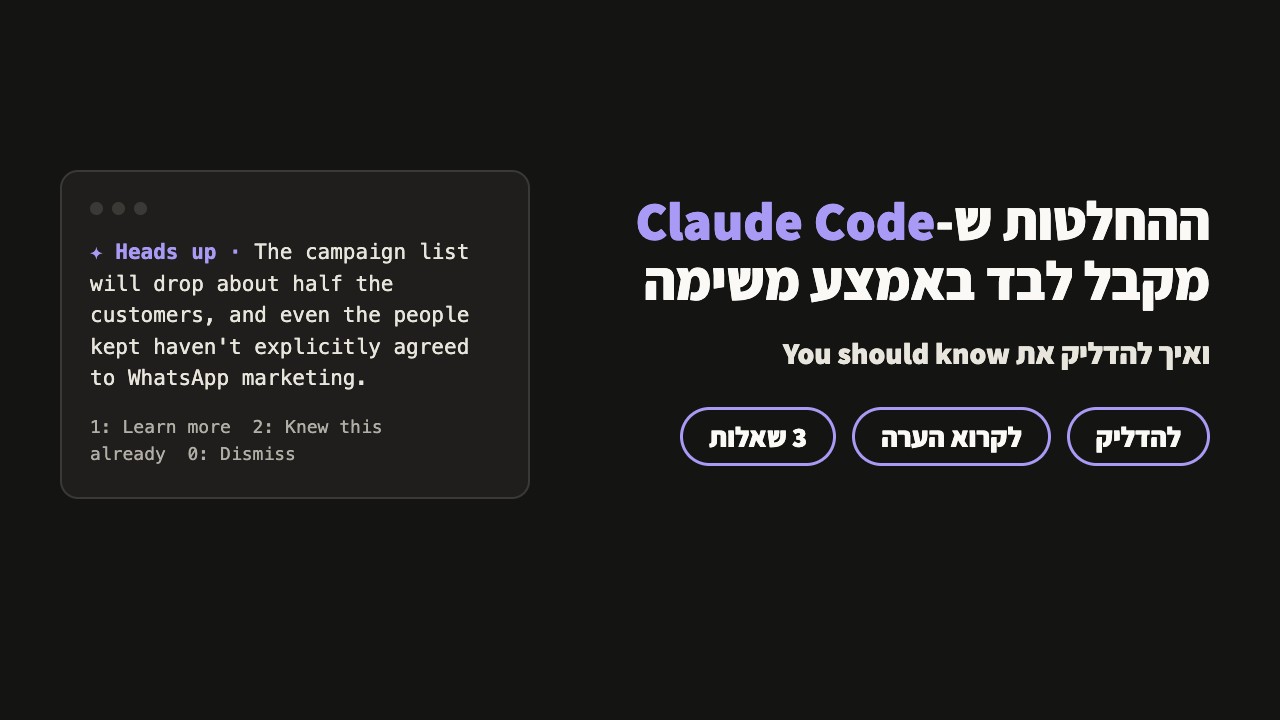
The example from the Reel
In a demo folder with made-up customers I asked Claude Code for one list for a WhatsApp campaign, from three files: a shop export, WhatsApp contacts and a newsletter list. I asked it to work in small steps: read each file, write a script, run it, write a test, and commit.
Along the way it set a rule on its own: anyone who signed up for the email newsletter goes on the WhatsApp list. Four of eight people were left.
At step six, 12 seconds before the list file even existed, this note appeared. This is the original output:
And after Learn more:
The note also has a line about the law, with the side agent's own hedge. That is its wording, not legal advice.
The agent doing the work said the same thing only at the end, in one line at the bottom of its summary:
That is the whole difference: the note came in the middle of the work, while you can still stop it. The line in the summary came after the list was already done.
Why it is quiet most of the time, and what it costs
- Its instructions say the bar for showing a note is very high, and when in doubt, show nothing.
- It only checks during a long task, every few steps. A 30-second task will almost never get a note.
- It skips topics you already talked about in the main conversation.
- Notes you ignore come back less: after a few, it checks less often.
- Every check runs the model, so it counts toward your plan's usage.
- In
claude -p, the screenless mode you run from scripts, it does not show up.
Three questions that get Claude to tell you what it decided on its own
The plugin does not catch everything, and it is not built to. So at the end of a long task, before you use the result, paste one of these:
1. Its decisions
Which decisions did you make on your own in this task that I didn't explicitly ask for?2. What went missing on the way
What did you delete, merge or skip, and why?3. What to check with your own eyes
What is the one thing I should check with my own eyes before I use the result?Turning it off
From the terminal:
claude plugin disable cc-plugin-you-should-know@builtin --scope userYou should see:
Or from inside Claude Code:
/plugin disable cc-plugin-you-should-know@builtinSources
- The plugin's description and the side agent's instructions were read from Claude Code itself, versions 2.1.323 and 2.1.325. The commands and the lines they print were checked on 2.1.325, in a separate config folder. I did not find an official docs page for this plugin.
- The example is real Claude Code output from a demo folder with made-up data, on 14 November 2026. The plugin was turned on for that run only.
- The @ClaudeDevs announcement of 2 October 2026, as summarized by dsebastien.net and claudelog.com.
What did it decide on its own for you?
Send me a DM on Instagram with a screenshot of the first note you got, and what Claude Code decided there without asking.
@danielthegoldman