A machine you can take apart, in Claude Code
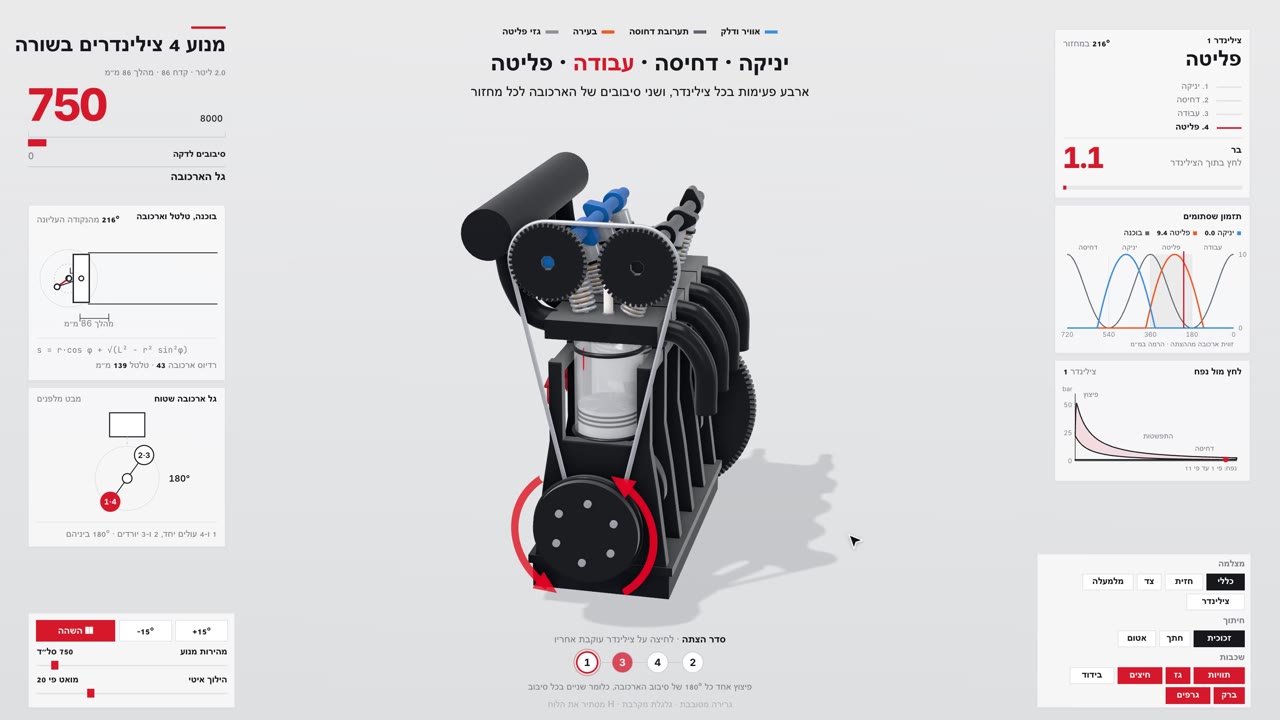
I asked Claude Code to explain how a car engine works. Instead of text, I got a 3D engine running in the browser, with a button that cuts one cylinder open and slows it down. The thing that did it is teardown, a free skill. In this guide: how to install it, how to run it, the exact prompt I gave it, and 3 machines to try first.
Who this is for
- You have Claude Code? Jump to part 3, install, and ask it about your first machine.
- Want to see what comes out first? Part 6 has the engine I got. It opens in your browser with nothing to install.
- No Claude Code yet? The skill only runs inside it. Start with the start-here guide and come back.
Contents
What teardown is
teardown is a skill: a file of instructions Claude Code reads and follows. You ask how a machine works, and it builds it as one HTML page that opens in the browser and works offline.
- The machine runs in the middle, with panels around it showing its real numbers.
- Every part has a button. Press it, and the part doing the work opens up: a cutaway, an inside view, slow motion.
- Leave it alone, and the page tours itself with a cursor, explaining each step.
- The same code records a video of the tour at 60 fps, with sound synced to the motion.
The difference from a normal explanation: the motion and the numbers come from one model. The piston moves by the real dimensions, and the pressure chart is derived from that same motion. Nobody drew an animation; a model runs.
What it costs and what you need
- The tool itself is free. Open source under MIT, no subscription, no sign-up.
- It runs inside Claude Code, so the build comes out of your plan's usage. My engine took half an hour of continuous agent work. This is a heavy task, not a quick question.
- You need Node.js 20 or newer. For the video you also need ffmpeg, and for the sound Python 3. Without them you get the live page, no video.
- A computer with a reasonable graphics card. The page lowers its quality when it gets slow, but on a very weak machine it will stutter.
Install, step by step
The short way: open Claude Code in any folder and paste this request. It installs the skill, sets up what it needs once, and checks what you are missing.
Install the teardown skill from https://github.com/elvarofficial/teardown
1. Run: npx skills add elvarofficial/teardown -g -a claude-code
2. In the folder it was installed to, run once: npm install && npx playwright install chromium
3. Check whether I have ffmpeg and Python 3, and tell me what is missing.
At the end, show me where its SKILL.md file is.Prefer to do it yourself?
Step 1: check what you have. Open the terminal, the window where you type commands, and run:
node --version
ffmpeg -version
python3 --version
node should show v20 or newer. If ffmpeg or python3 is not found, ask Claude Code to install them.
Step 2: install the skill for all your projects:
npx skills add elvarofficial/teardown -g -a claude-codeStep 3: go into the folder it was installed to and run this once. It downloads its libraries and the browser it records the video with:
npm install && npx playwright install chromiumBefore you install, what it runs: the commands above fetch the latest version from GitHub and npm, and install a Chromium browser. While it works, the skill runs Node, ffmpeg and Python on your computer. I read the code before running it and found nothing that sends data out. I ran the build in a separate folder.
How to run /teardown
Open Claude Code in an empty folder, since it saves what it builds there. Type /teardown followed by a plain question:
/teardown how does a car engine work?Why start with /teardown? The first time I asked without it, Claude Code ignored the skill and built something else entirely. With /teardown it knows exactly what to do.
What happens next:
- It picks a real machine that matches your question, and looks up its dimensions.
- It builds the model, the panels and the buttons, and checks itself against stills of the page.
- At the end it opens the page for you and explains what it built and which choices it made. Files go into
teardown-out.
Want a video too? Ask for it in the same request, like in part 5.
The exact prompt I gave it
This is the prompt, word for word, that produced the engine in the video. I wrote it in Hebrew:
/teardown תסביר לי איך עובד מנוע של רכב רגיל. ארבעה צילינדרים בשורה, כמו באוטו שלי. אני רוצה לראות את זה, לא לקרוא. בסוף תקליט לי גם סרטון של הסיור.In English:
/teardown Explain how a regular car engine works. Four cylinders in a row, like in my car. I want to see it, not read it. At the end, also record me a video of the tour.Why it works:
/teardownfirst makes it use the skill.- "Four cylinders in a row" gives it a defined machine. Without it, it picks one itself, and not always the one you meant.
- "See it, not read it" tells it to put the explanation on screen, next to the moving part.
- "Also record a video" adds the video, which is not built by default.
Want your own car's engine? Write the model instead of "like in my car". It will look up its dimensions.
What I got
I ran the prompt on my computer. After 29 minutes I had one file, 812 KB, that works offline.
Open my engine in your browserThe page is built for a computer screen, full width. On a phone it comes out small in the middle of the screen, so open it on a computer or turn the phone sideways.
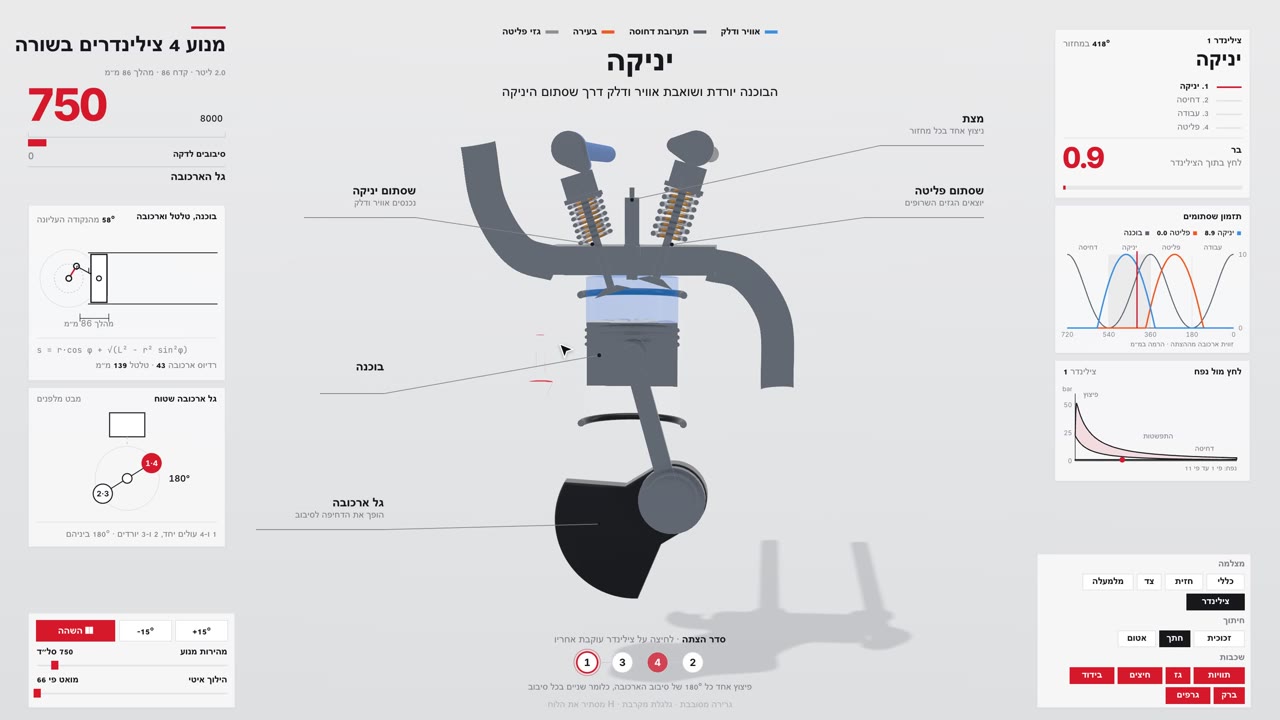
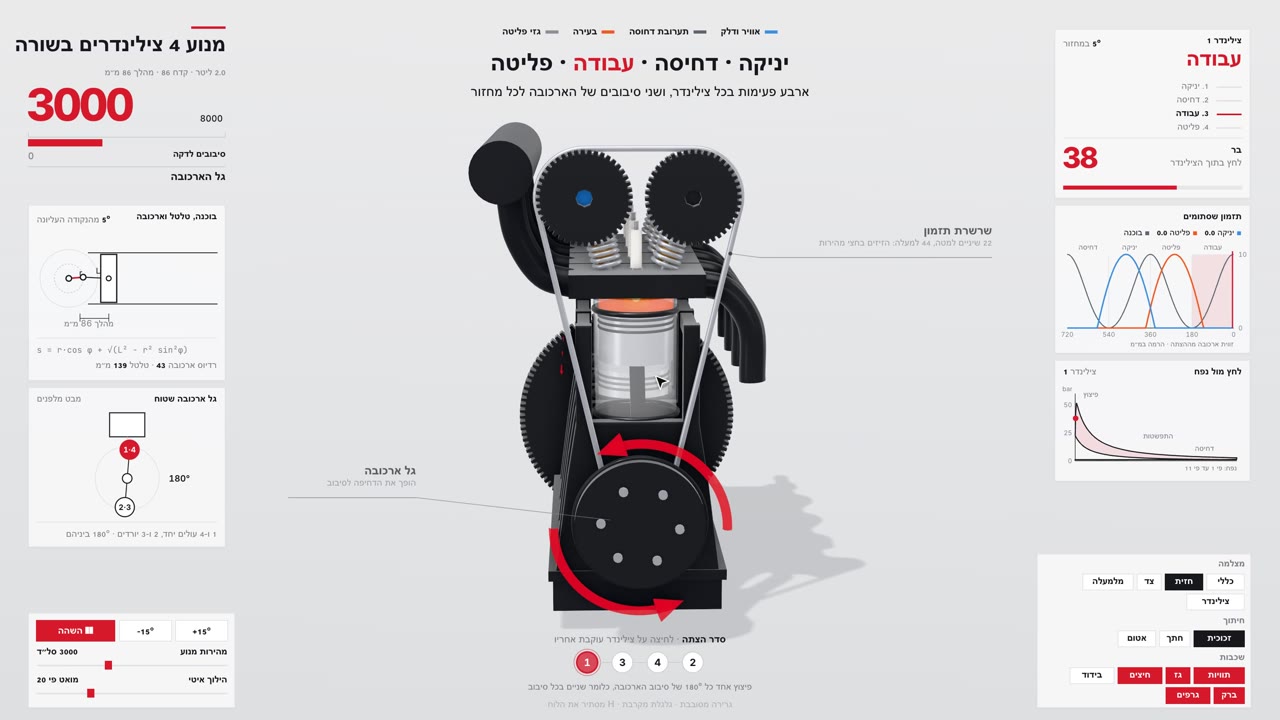
- Dimensions: I did not say which car, so it picked a Honda K20A. 86 mm bore, 86 mm stroke, 1998 cc.
- The lesson: it cuts one cylinder open and slows it down 66 times. Intake, compression, power, exhaust, each step explained on screen (the labels are in Hebrew because I asked in Hebrew).
- The video: 30 seconds at 60 fps, with sound on the same timing.
- What it said itself was not exact: each cylinder is shown with two valves instead of the real engine's four. Good that it said so.
3 machines to try first
The skill ships with three machines already written in code. It only packs them into one file, with no half hour of building, so this is the fastest way to see what it can do before you build your own:
- v8: a V8 engine with glass cylinders. You see the charge burn inside the cylinder and the firing order.
- cessna: the main landing gear of a Cessna 337, folding into the airframe on takeoff and dropping on landing.
- strandbeest: Theo Jansen's walking beast. Twenty legs on one crankshaft, walking in the wind.
Paste into Claude Code, one at a time:
/teardown build the v8-live example and open it for me
/teardown build the cessna-live example and open it for me
/teardown build the strandbeest-live example and open it for me
And once you have seen them, three ideas to build yourself:
/teardown How does a mechanical watch keep time? Show me as a simulator.
/teardown How does a manual gearbox work?
/teardown Make a teardown of a hydraulic excavator arm and record a 20-second video of it.How to tell it worked
It worked if a page opens with the machine in the middle, panels around it and buttons below, and it starts touring by itself. The file is in teardown-out.
Didn't work? In order:
- Got a text explanation or something else? It did not use the skill. Start a new chat and begin with
/teardown. - It says
/teardowndoes not exist? The install failed. Run step 2 of part 3 again and restart Claude Code. - The page was built but there is no video? ffmpeg is missing, or you skipped step 3.
- Stuck on an error? Paste it into Claude Code as is and write "what is this and what do I do".
Credit and license
teardown is built by elvarofficial and published under the MIT license: you may use, change and share it, commercially too. It builds on claude-motion (MIT).
The code and full instructions: github.com/elvarofficial/teardown
Built a machine of your own?
Send me a DM on Instagram with what you asked and what came out. I want to see what people take apart.
@danielthegoldman