Your site looks like an agent designed it
You built your site with Claude Code, Lovable or Cursor, and it works. But anyone who opens it can tell within a second that an agent designed it, because every agent makes the same mistakes. This guide gives you the list of signs, so you can check your own site, and shows how to install unslop, a free skill that cleans them up for you.

Who it is for
- You have a site, landing page or dashboard an agent built? Start with the list in part 1. It takes two minutes and needs no tools.
- You have Claude Code or Codex? After the list, jump to part 4 or 5, install, and run it.
- No Claude Code yet? The tool only runs inside a coding agent. Start with the starter guide and come back.
Contents
The check: signs that give your site away
Open your site on your phone and on your computer, and go through the list. Tick every sign you see.
Color and background
- Purple to blue or purple to pink gradients on the background, cards or buttons.
- A heading or logo whose text itself is a gradient.
- Buttons, badges and cards with a colored glow around them.
- Blurred color blobs or floating orbs behind the content.
- Neon colored borders.
- Everything highlighted in color, so nothing stands out.
Icons
- Emoji in the menu, next to headings or as status: 🚀 🔥 💰 📈.
- A ✨ next to anything AI.
- Badges like
New ✨,Beta 🚀orPROin every corner.
Text
- Headings in the heaviest weight there is.
- Uppercase labels with wide letter spacing, like
NAVIGATION. - Exclamation marks, sometimes two in a row.
- A headline that fits any product, like
Supercharge your workflow with AI, and words like supercharge, seamless, magic. - Numbers with no reference, like
+12%!!, instead of "+12% vs last month".
Spacing
- Rows in the same list at different heights, or identical cards with different inner padding.
- A huge gap above one section and cramped space below it.
The landing page
- A pill badge above the headline, like
✨ Introducing X 2.0. - Everything in one centered column: headline, text, buttons, and a picture below.
- Three or more buttons side by side.
Trusted by 10,000+ teams, a row of colored avatar dots and five stars, with no source.- A glossy 3D blob or a purple nebula as the hero image.
Motion
- Things that pulse or glow all the time, with nothing actually happening.
- Buttons and cards that grow on hover, and elements flying in from every direction.
Ticked signs in several different groups? That is exactly what unslop was built for, and it will go over the whole screen. Ticked one or two? It will do a small polish and leave the rest as it is.
This list is adapted and shortened from the signs.md file of unslop, by Damir Sokolovsky (@heydamir), licensed CC BY 4.0. The original has more signs, each with its fix.
What unslop is
unslop is a skill: a file of instructions your agent reads and follows. It was built for Claude Code, Codex and Google Antigravity. It goes over the screen with the list above, finds every sign and where it lives in the code, and fixes the screen pass by pass, like a designer doing a redline review.
It works in whatever your site is built with: Next.js, React, Vue, Svelte, Tailwind or plain HTML. On landing pages, dashboards and apps. And if all you have is a link to the site, not the code, it saves a copy of the page and redesigns it in code, so you can hand it to whoever owns the site.
It went up on GitHub on October 29, 2026. By November 13 it had more than 15,000 stars, the way people there mark a project worth keeping.
What it costs and what you need
- The tool itself is free. No subscription, no sign up.
- But it only runs inside a coding agent: Claude Code, Codex or Antigravity. The run comes out of your agent plan, like any other task.
- Images are optional and paid. When a page needs a new hero image, it can generate one through a service like fal or Replicate. Before every paid generation it shows the prompt and asks. Dashboards and apps almost never need one.
- A link to a live site needs Playwright. Only when you do not have the code. Details in part 6.
Install in Claude Code
The short way: open Claude Code in any folder and paste this request. It downloads the skill and puts it in your skills folder, so it is available in every project.
Install the unslop skill from https://github.com/heydamir/unslop
Copy the skills/unslop folder into ~/.claude/skills/ as the README says.
At the end, show me that ~/.claude/skills/unslop/SKILL.md exists.Rather do it yourself? Open the terminal, the window where you type commands, and run the two lines from the tool's README:
git clone https://github.com/heydamir/unslop
mkdir -p ~/.claude/skills && cp -r unslop/skills/unslop ~/.claude/skills/
Want it in one project only? Copy the unslop folder into .claude/skills/ inside that project instead of the global folder.
Install in Codex and Antigravity
In Codex, ask it to install the skill straight from the repo. Paste this line into the chat:
$skill-installer install https://github.com/heydamir/unslop/tree/main/skills/unslopOr copy it by hand from the terminal:
git clone https://github.com/heydamir/unslop
mkdir -p ~/.agents/skills && cp -r unslop/skills/unslop ~/.agents/skills/
In Google Antigravity, copy it into its skills folder:
git clone https://github.com/heydamir/unslop
mkdir -p ~/.gemini/antigravity/skills && cp -r unslop/skills/unslop ~/.gemini/antigravity/skills/Run it: clean up my site
Open Claude Code in your site's folder and write, in your own words:
clean up my siteThe agent recognizes this as a job for the skill. Want to be sure it uses it? Start with /unslop, and if there are several screens, say which:
/unslop clean up my home page
/unslop this dashboard
/unslop the hero of https://example.com
In Codex, type $unslop instead of /unslop.
What happens next, in order:
- It looks at the screen and goes through the list. Every sign it finds, with its place in the code.
- It writes a direction in five lines, from what your product does: the product, its character, the world it belongs to, where the color goes, and one detail only your product has.
- It stops and waits for you. This is the moment to correct it. Changing direction later means redoing everything.
- Once you approve, it fixes in nine passes: spacing, color, icons, copy, type, layout, details, visuals and motion.
- At the end it checks the screen against the list and sums up what changed in each pass.
Only have a link to the site? First run these two commands in the folder you work in, then give it the link:
npm install -D playwright
npx playwright install chromiumWhat I got when I ran it
I ran it on the demo page that comes with the tool: a landing page for invoicing software, exactly the way an agent builds one. I told it upfront to pick the direction itself and not stop, so it skipped the approval step.

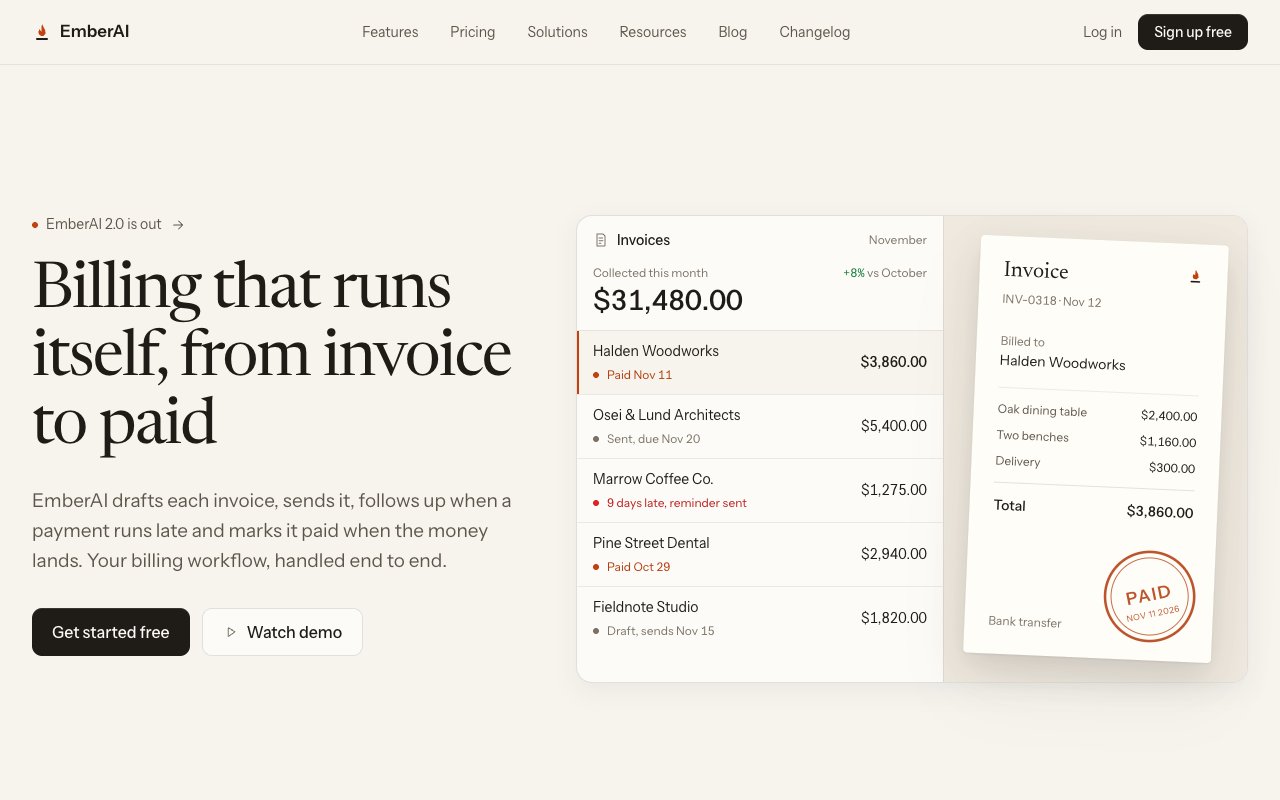
- The audit found signs in eight groups. Among them: emoji in the menu and buttons, a gradient headline and logo, and 14 arbitrary spacing values.
- The direction it chose: a small business owner's desk. Invoice paper, a "paid" stamp, and one orange color that comes from the product's name.
- The result: the same content and the same sections, and the purple blob replaced by a preview of a real invoice.
How to tell it worked
Before it changes anything, you should see a list of signs with each one's place in the code, then a five line direction and a question to you. If it started editing files without that list, it did not use the skill.
Did not work? In order:
- Check the skill is in place. In Claude Code there should be a file at
~/.claude/skills/unslop/SKILL.md, and in Codex at~/.agents/skills/unslop/SKILL.md. - Open a new conversation with the agent and type
/unslopor$unslopexplicitly. - Gave it a link and it failed? Playwright is missing. Run the two commands from part 6.
- It said the screen is already good? That is a real answer. It suggests up to three small changes and applies them only if you agree.
Credit and license
unslop was built by Damir Sokolovsky (@heydamir) and is published under CC BY 4.0: you may use, change and share it, commercially too, as long as you credit him and link back to the repo. The list of signs in part 1 is adapted and shortened from the original.
The code, full instructions and the two demo pages: github.com/heydamir/unslop
Ran it on your site?
Send me a before and after screenshot in an Instagram DM. And if you got stuck halfway, paste the error into Claude Code as it is and write "what is this and what do I do".
@danielthegoldman