Someone comments a keyword, the bot sends the guide
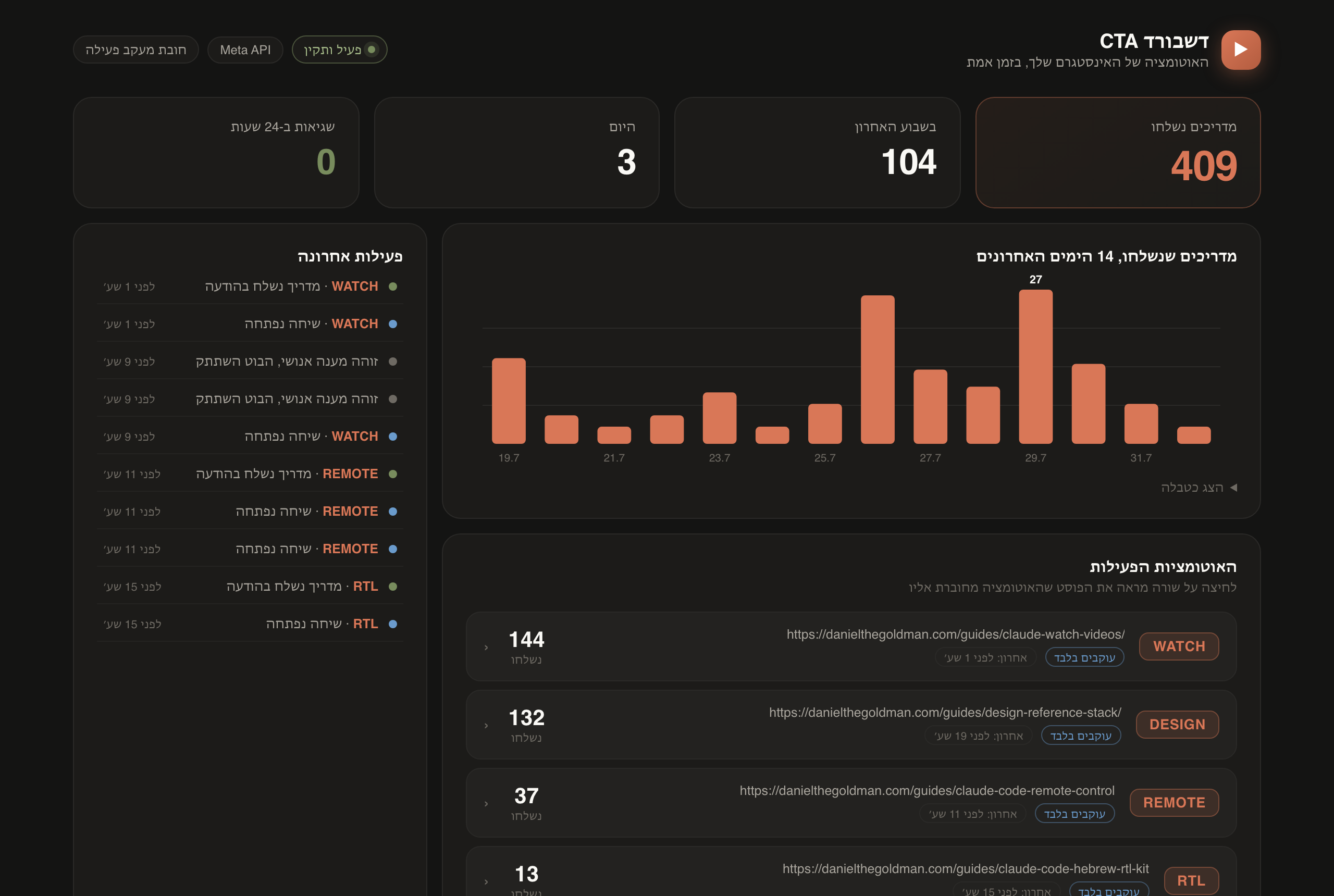
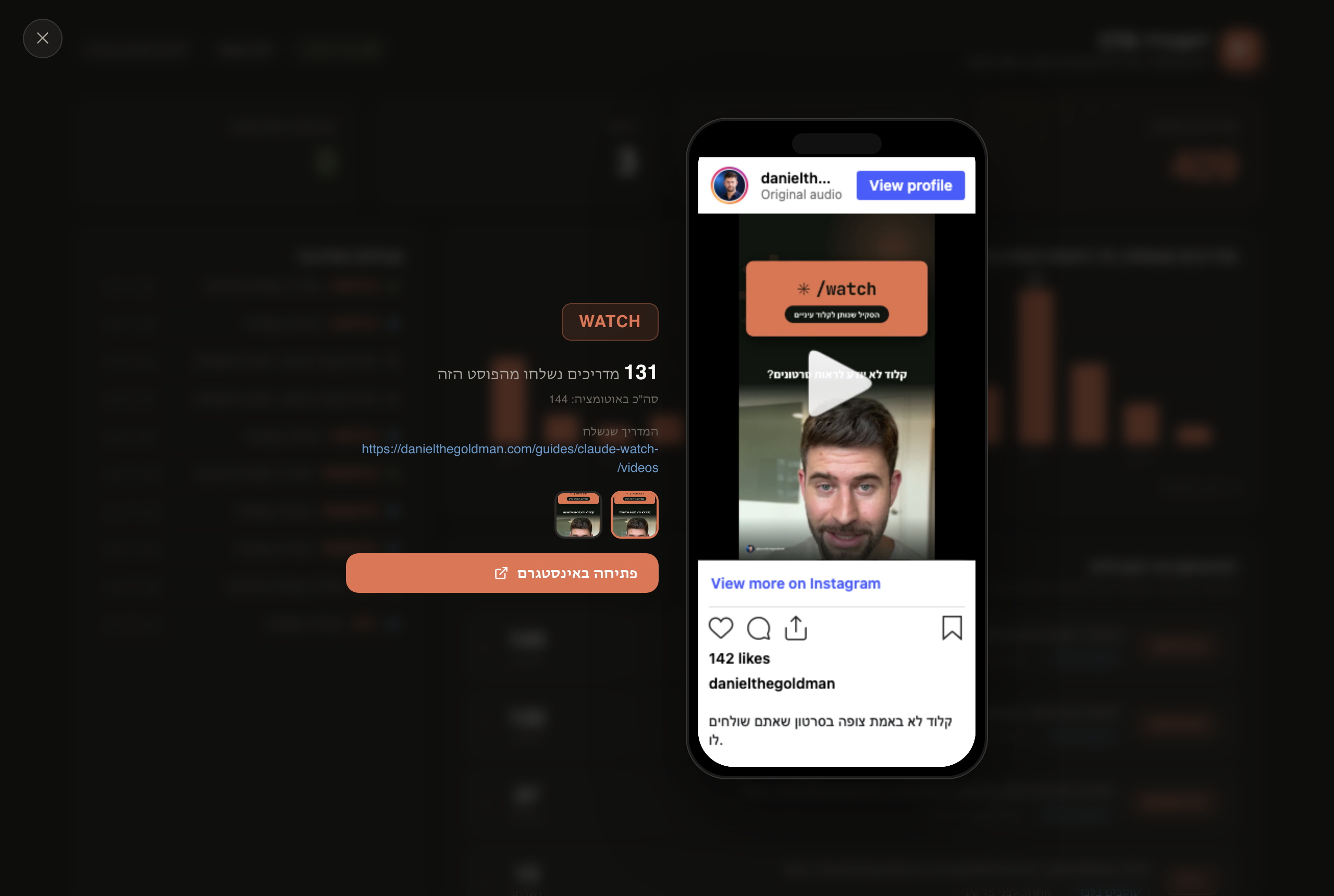
This is the full walkthrough for running keyword automation on your own Instagram account. Someone comments CHECKLIST under a post, the bot replies publicly, sends them a DM asking whether to send the guide, and delivers the link once they say yes. All of it runs on the official Meta API, with no scripts pretending to be a browser and no risk to your account.
You do not need to know how to code. Every step has a command you can copy, plus a prompt you can paste into Claude Code so it does the step for you. We start on your own machine, and only move to a 24/7 server once it works.
What you will have at the end
- At least one keyword that works in comments, DMs, and Story replies
- An automatic public reply under the post, and a private DM with a confirm button
- A guide link sent only after the user asks for it, tracked per campaign
- An optional follower gate, if you want one
- A local queue that survives a crash, with retries and a dead-letter list
- A clear way to tell your own failures apart from an Instagram rejection
How it works
Worth understanding before you install anything, because every later problem sits on one of these stops.
- 01Comment or DMSomeone writes the keyword
- 02HookMyAppReceives from Instagram, forwards signed
- 03Local queueWritten to disk before acknowledging
- 04Keyword matchExact match, never a guess
- 05Reply and DMPublic reply plus a confirm question
- 06The guideOnly after the user confirms
Note one thing: no model writes the replies. The messages are fixed in a file, and the keyword is matched exactly. That is what makes the system predictable, which is exactly what you want on your real account.
Before you start
- A Business or Creator Instagram account. A regular personal account is not supported by the API. You can switch in Instagram settings in about a minute, without losing content
- Node.js 20 or newer on your machine
- A HookMyApp account. This is what saves you from building your own Meta app
- A real guide page to send people to. A link that returns 404 fails validation on purpose
- A second Instagram account for testing, or a friend willing to comment once
Why HookMyApp instead of a Meta app
The steps
- 01.Install the two tools
- 02.Connect Instagram through HookMyApp
- 03.Create the project folder
- 04.Add your connection details
- 05.Define a real keyword
- 06.Test locally without touching Instagram
- 07.Test against real Instagram, still sending nothing
- 08.Go live
- 09.Move it to a 24/7 server
- 10.Maintenance: the weekly check
Steps 01 to 08 are the local track. At the end of them you have a working bot, as long as your computer stays on. Steps 09 and 10 move it to a server. You can stop after 08, see it work, and come back to the server another day.
Track one: run it on your machine
The goal here is a real result fast, with no server and no domain. Everything runs locally, in a mode where the bot computes the reply but sends nothing. We open the tap only at step 08.
Install the two tools
You need two command line tools. hookmyapp manages the Instagram connection, and instagram-cta manages keywords, replies, and the local queue. Open a terminal and paste:
npm install -g @gethookmyapp/cli
npm install -g github:dangogit/instagram-cta-kitVerify the install:
node -v
hookmyapp --version
instagram-cta --helpNot sure you have Node, or a command errors out? This prompt handles it:
I want to install the tools for the Instagram CTA Kit guide.
Check whether Node.js 20 or newer is installed on my machine. If not, install it the right way for my OS.
Then install both packages globally:
npm install -g @gethookmyapp/cli
npm install -g github:dangogit/instagram-cta-kit
Finally run node -v, hookmyapp --version and instagram-cta --help and show me the output.
If something fails on permissions, fix it without sudo if possible, and tell me what you did.Check: All three commands run without error, and node -v returns v20 or higher.
Connect Instagram through HookMyApp
Three commands. The first opens a browser to sign in, the second opens Meta's permission screen, and the third shows the channel that was created.
hookmyapp login
hookmyapp channels connect instagram
hookmyapp channels listOn the Meta screen that opens, pick the professional Instagram account that should run the automation, and approve the permissions for reading comments and sending messages. If your account is not in the list, it is probably still personal. Switch it to Business or Creator in Instagram, then run channels connect again.
The last command returns a channel id that looks like ch_xxxxxxxx. Copy it somewhere, because nearly every command from here on takes it.
Keep the id, never share the secrets
Check: hookmyapp channels list shows at least one Instagram channel, with the right username.
Create the project folder
One command creates a folder with a config file, a keyword file, and a state directory. Use --locale he if you want Hebrew default messages.
instagram-cta init --dir ./my-instagram-cta --provider hookmyapp --locale enCreated Instagram CTA config in /Users/you/my-instagram-cta
Next: connect Instagram with hookmyapp, write its channel env into .env,
add WEBHOOK_HMAC_SECRET, then run instagram-cta doctorThree things now exist: .env with settings and secrets, routes.json with your keywords, and a state directory holding the queue. Never push .env or state to GitHub.
Check: Running ls -a my-instagram-cta shows .env, routes.json, and state.
Add your connection details
The first command writes the connection details straight into .env. The second prints the signing secret, which you copy in manually. Replace ch_YOUR_CHANNEL with your id.
hookmyapp channels env ch_YOUR_CHANNEL --write ./my-instagram-cta/.env
hookmyapp channels webhook hmac show ch_YOUR_CHANNELThe first command fills five fields: INSTAGRAM_GRAPH_API_URL, INSTAGRAM_ACCESS_TOKEN, INSTAGRAM_ACCOUNT_ID, HOOKMYAPP_CHANNEL_ID, and VERIFY_TOKEN. Paste the value from the second command into the WEBHOOK_HMAC_SECRET line in the same file.
Do not want to edit a file by hand? That is exactly what this prompt does:
There is an Instagram CTA Kit .env file in ./my-instagram-cta.
1. Run: hookmyapp channels env ch_YOUR_CHANNEL --write ./my-instagram-cta/.env
2. Run: hookmyapp channels webhook hmac show ch_YOUR_CHANNEL
3. Take the value it returns and set WEBHOOK_HMAC_SECRET in the .env file to it.
4. Make sure DRY_RUN=1 stays as it is. Do not change it.
5. Run instagram-cta doctor --dir ./my-instagram-cta and show me the output.
Important: do not print the token or secret values in chat.
Only tell me which fields were filled and which are still empty.Now run the health check:
instagram-cta doctor --dir ./my-instagram-cta✓ Node.js: 22.21.1
✓ .env: /Users/you/my-instagram-cta/.env
✓ provider: hookmyapp
✓ VERIFY_TOKEN: configured
✓ CTA_ADMIN_TOKEN: configured
✓ CTA_ATTRIBUTION_SECRET: configured
✓ HookMyApp CLI: 0.14.1
✓ routes.json: 2 routes
✓ state directory: /Users/you/my-instagram-cta/state
✓ route validation: passedCheck: Every line is a check mark. A field marked placeholder allowed in dry run is not filled yet. That is fine for local testing, but it must be real before step 08.
Define a real keyword
Add a keyword pointing at a real guide of yours. --campaign-id is an internal tracking name, and it should stay stable over time so the data accumulates.
instagram-cta route add CHECKLIST https://your-site.com/guides/your-guide \
--dir ./my-instagram-cta \
--campaign-id my-checklistHebrew keywords work too, including recovery from a single character typo. Want the guide sent only to followers? Add --follow-gate. It does lower conversion, so consider starting without it.
The trap you will hit, so here it is in advance
init creates two example keywords, GUIDE and a Hebrew one, both pointing at example.com, which does not exist. The moment you run link validation it fails with a long, ugly Node error that looks like you broke something:
AssertionError [ERR_ASSERTION]: GUIDE guide_url returned 404
2 !== 0You broke nothing. You just need to delete the two example keywords from routes.json and keep only yours. There is no CLI command to remove a keyword, so this is a manual file edit, or a prompt.
Open ./my-instagram-cta/routes.json.
Delete the two auto-generated example keywords: GUIDE and the Hebrew one.
They point at example.com and therefore break link validation.
Keep only the keywords I added myself.
Keep the JSON valid, then run:
instagram-cta routes validate --dir ./my-instagram-cta --check-guides
and show me the result.Validation should now pass. It confirms every guide link actually returns a live page:
instagram-cta routes validate --dir ./my-instagram-cta --check-guidesroutes ok: 1Check: routes ok shows your keyword count, with no errors and no 404.
Test locally without touching Instagram
This is the most important step in the guide, and the easiest to skip. Before connecting a real account, prove the engine works: send it a fake comment and watch it get queued, processed, and completed. Instagram is not involved at all.
Start the service. Leave this terminal open:
instagram-cta start --dir ./my-instagram-ctainstagram-cta listening on http://127.0.0.1:18787Open a second terminal and check the service is healthy:
curl -s http://127.0.0.1:18787/healthIn the response, look for four things: "ok":true, "provider":"hookmyapp", "dry_run":true, and a queue of zeros.
Now send a fake comment. This prompt does all the work, including the signature the server requires:
An Instagram CTA Kit service is running from ./my-instagram-cta on http://127.0.0.1:18787 in DRY_RUN mode.
I want to test it without touching Instagram.
Build me a local test:
1. Read WEBHOOK_HMAC_SECRET from the .env file.
2. Build an Instagram-shaped webhook body with one comment containing exactly the keyword I defined in routes.json.
3. Sign the body with HMAC SHA256 using that secret, and POST it to http://127.0.0.1:18787/webhook
with the header X-HookMyApp-Signature-256 in the form sha256=<signature>.
4. Show me the response status code and body.
5. Wait two seconds, then curl /health and show me only the queue section.
I expect HTTP 200, then a completed_count of 1 in the queue.
Never print the secret itself.The response should look like this, and the queued field is your proof the event landed:
HTTP 200
{"ok":true,"queued":[{"type":"comment","external_id":"cmt_test_1","duplicate":false}]}And a second or two later, the queue should look like this:
"queue": {
"pending_count": 0,
"processing_count": 0,
"completed_count": 1,
"dead_letter_count": 0
}Check: completed_count went to 1 and dead_letter_count stayed at 0. That is it, the engine works. If you got here, all that is left is connecting the real pipe.
Got a 403 instead of a 200?
WEBHOOK_HMAC_SECRET in the file differs from what hookmyapp channels webhook hmac show prints. Run it again, update the file, and restart the service. An updated secret is not loaded until restart.Test against real Instagram, still sending nothing
Your machine is not reachable from the internet, so you need a tunnel to carry events from HookMyApp to you. Leave start running, and in the second terminal run:
hookmyapp channels listen ch_YOUR_CHANNEL --port 18787 --path /webhookNow go to Instagram from another account and write your keyword in a comment on one of your posts. Back in the terminal, check:
instagram-cta status --dir ./my-instagram-cta
hookmyapp channels logs list ch_YOUR_CHANNELBecause DRY_RUN is still on, nothing was sent. But you should see the event arrive and get handled. That is proof the whole pipe works: Instagram, HookMyApp, the tunnel, and your engine.
The tunnel is for development only
channels listen lives only while that terminal is open. Close it and events stop arriving. That is exactly why this guide has a second track.Check: status shows the event counted, and the HookMyApp log shows a successful delivery to your endpoint.
Go live
Before turning DRY_RUN off, walk this list. Every line exists because someone got burned without it:
instagram-cta doctor --livepasses with no errors- Link validation passes and every guide returns a live page
/healthshows an empty queue and zero dead letters- The example keywords are deleted, leaving only yours
- You have a test account ready for the first controlled run
Set DRY_RUN=0 in .env, restart the service, and run one controlled test from another account. Follow all four stages:
- 01.The public reply appeared under the post
- 02.The private DM with the confirm question arrived
- 03.The button tap reached the service
- 04.The guide link was actually delivered
I am about to go live with Instagram CTA Kit in ./my-instagram-cta.
Before I change DRY_RUN, run the production checklist and tell me if I am ready:
1. instagram-cta doctor --dir ./my-instagram-cta --live
2. instagram-cta routes validate --dir ./my-instagram-cta --check-guides
3. curl -s http://127.0.0.1:18787/health
Check the results for:
- no placeholder left in any required field
- every guide_url returns 200
- pending_count and dead_letter_count are both 0
- the example keywords GUIDE and the Hebrew one are gone
Summarize in one line: ready or not ready, and if not, exactly what is missing.
Do not change DRY_RUN yourself. I will do that manually after you confirm.A DM can be rejected even when everything on your side is right
Check: The controlled test passed all four stages, and status shows zero stuck events.
Track two: a server that runs 24/7
So far the bot only works while your computer is on and the tunnel is running. Now we move it somewhere always on, and replace the temporary tunnel with a permanent address.
Move it to a 24/7 server
You need two things: a machine that stays on, and a public HTTPS address ending in /webhook. A Mac mini at home works, so does a small cloud server, or a machine behind a permanent Cloudflare tunnel.
The simplest way to run it in the background is Docker. From the project folder:
docker compose up -d --build
docker compose logs -fOnce the service runs on the server and you have a domain, set the permanent address instead of the tunnel. The --verify-token value is the one already in your .env, not a new one:
hookmyapp channels webhook set ch_YOUR_CHANNEL \
--url https://your-domain.com/webhook \
--verify-token YOUR_VERIFY_TOKEN
hookmyapp channels webhook show ch_YOUR_CHANNEL
hookmyapp channels health ch_YOUR_CHANNELPrefer no Docker? The project ships templates for launchd on macOS and systemd on Linux, and on Windows you can run the same start command from Task Scheduler. This prompt adapts the template to your machine:
I want Instagram CTA Kit to run in the background and survive a reboot.
The folder is ./my-instagram-cta.
1. Detect which operating system I am on.
2. Pick the right approach: launchd on macOS, systemd on Linux, or Docker if it is already installed.
3. Take the matching template from the project's templates folder and adapt it:
real folder path, real node path, correct permissions.
4. Install the service, start it, and confirm it came up.
5. Run curl http://127.0.0.1:18787/health and show me that it returns ok.
6. Restart the service once to prove it comes back on its own.
Do not expose the port to the internet. It must stay on 127.0.0.1,
with a reverse proxy handling HTTPS in front of it.Do not expose the port directly
Check: The server answers /health, and hookmyapp channels health shows the permanent address verified.
Maintenance: the weekly check
Once it is live, the weekly check takes a minute. You are looking for stuck events and failures:
instagram-cta status --dir ./my-instagram-cta
instagram-cta dead-letter list --dir ./my-instagram-ctaAn event that failed temporarily returns to the queue on its own. One that was permanently rejected sits in the dead-letter list with a reason. You can retry it or mark it handled:
instagram-cta dead-letter retry EVENT_KEY --dir ./my-instagram-cta
instagram-cta dead-letter resolve EVENT_KEY --reason "Instagram rejected this recipient" --dir ./my-instagram-ctaDo not mark a failure resolved before checking whether the user got the reply and the DM. That list is your only source of truth for people who asked for a guide and never got one.
Run a weekly check on my Instagram CTA Kit in ./my-instagram-cta:
1. instagram-cta status --dir ./my-instagram-cta
2. instagram-cta dead-letter list --dir ./my-instagram-cta
3. instagram-cta routes validate --dir ./my-instagram-cta --check-guides
Then summarize in five lines or fewer:
- how many events are stuck in the queue, and the age of the oldest
- how many permanent failures there are, and the most common reason
- whether any guide link broke and returns 404
- whether anything needs my attention right now
Do not run retry or resolve without asking me first.Check: pending_count is low or zero, and there are no new failures you have not looked at.
Troubleshooting
Link validation fails with a long error
Almost always the example keywords pointing at example.com. Delete them from routes.json. See step 05.
The comment landed but no DM arrived
Run status, then dead-letter list. If the event is there, read the reason. Instagram can permanently reject a private reply for policy or recipient reasons.
Webhook verification fails
Confirm the URL ends with /webhook, that the same verify token is set both in HookMyApp and in your file, and that the service was already running when you set the address.
A signed request returns 403
The signing secret does not match. Run hookmyapp channels webhook hmac show again, update WEBHOOK_HMAC_SECRET, and restart the service.
The Instagram account does not appear when connecting
It is probably still a personal account. Switch it to Business or Creator in Instagram settings, then run hookmyapp channels connect instagram again.
The same keyword for two different guides
You need to scope each keyword to specific posts. Without that, a DM containing the word is ambiguous, and the system deliberately ignores it rather than guessing.
Security, briefly
- Never push
.env,routes.json, or thestatedirectory to GitHub - Any secret that appeared in a chat, a screenshot, git history, or an issue counts as leaked. Regenerate it
- The
statedirectory holds message text and user ids. That is personal data, treat it as such CTA_ADMIN_TOKENis a password. It controls retry and dead-letter actions- Keep the port on
127.0.0.1, with HTTPS in front - Use only the official API. Browser-impersonating automation puts the account at risk
What this kit does not do
Better to know now than to find out mid-campaign:
- One professional Instagram account, one process, one state directory. Not multi-tenant
- Delivery is at least once. If the process dies between the send and the success record, a step may be sent again
- History depth is limited. The reconciliation scan is a safety net, not a promise to recover all past events
- No model writes replies. Every message comes from your keyword file
- Meta messaging rules change. Review current policy before a large campaign
The code and full docs
The project is open source under MIT. It also includes docs for the direct Meta path, service templates for macOS and Linux, and an agent skill that lets a coding agent operate the kit without reading secrets into chat.
github.com/dangogit/instagram-cta-kit